I've uploaded Send Tabs version 0.1, modified from the original for compatibility with Firefox 1.5 - 2.0.
sendtabs-0.1.xpi (3 KB; English (United States); compatible with Firefox 1.5 - 2.0.0.*)
Send Tabs works by enumerating the URLs of all open browser tabs and sending that list, along with a default email subject line, as a "mailto" URL and passing it to the "mailto" protocol handler which invokes the system default email client. It works very well until the maximum of ~462 characters (subject line + URL list combined) is exceeded; at that point you get an error.
That glaring limitation makes Send Tabs useless if you have a lot of URLs to send. The goal of the next few milestone releases is to overcome this barrier.
09 December 2006

03 December 2006
Ideas
Picture this common Web browsing scenario: You've got multiple browser tabs open in Firefox, and you want to email a friend a list of URLs of all the really cool, must-see Web pages in the browser tabs you've got open.
While there is a "Send Link" command in Firefox (and in most other Web browsers), it only creates an email message containing the URL of the tab that was focused at the time the Send Link command was invoked. If you wanted to include the URLs of the other tabs, you would have to switch to each tab and copy and paste the URL from the location bar into the email. And if there are a lot of open tabs, that can be a real chore.
I propose an extension that would eliminate this needless copying and pasting. Called "Send Tabs," it will open an email message composition window where it will populate the message body with a bulleted list of URLs of all the Web pages displayed in all open tabs.
I had actually started working on this a while back, and got as far as creating a prototype of it before the project was abandoned when other things came up. Now, with Clippings 2.5 done and me restlessly thinking of other things to keep me busy and out of trouble, the Send Tabs idea seems to be worth revisiting.
There is some preliminary research and studying for me to do before resuming work on Send Tabs, but for now, what do you think? Comments on this idea are welcome.
While there is a "Send Link" command in Firefox (and in most other Web browsers), it only creates an email message containing the URL of the tab that was focused at the time the Send Link command was invoked. If you wanted to include the URLs of the other tabs, you would have to switch to each tab and copy and paste the URL from the location bar into the email. And if there are a lot of open tabs, that can be a real chore.
I propose an extension that would eliminate this needless copying and pasting. Called "Send Tabs," it will open an email message composition window where it will populate the message body with a bulleted list of URLs of all the Web pages displayed in all open tabs.
I had actually started working on this a while back, and got as far as creating a prototype of it before the project was abandoned when other things came up. Now, with Clippings 2.5 done and me restlessly thinking of other things to keep me busy and out of trouble, the Send Tabs idea seems to be worth revisiting.
There is some preliminary research and studying for me to do before resuming work on Send Tabs, but for now, what do you think? Comments on this idea are welcome.
15 October 2006
Clippings 2.5 released
In addition to compatibility with Firefox 2, this update contains feature enhancements and various improvements to stability, making this release the most reliable to date. Clippings 2.5 also contains added language support for Croatian, Dutch and Hungarian.
Clippings 2.5 is now available for download from the Clippings website, http://clippings.mozdev.org, or from the download link below:
clippings-2.5.xpi (101 KB; compatible with Firefox 1.5 - 2.0.0.x and Thunderbird 1.5 - 1.5.0.x)
Supported languages: English (United States), Chinese (traditional and simplified), Croatian, Dutch, French, German, Hungarian, Italian, Russian, Slovak, Spanish, Ukrainian.
If you already have Clippings installed, it will be upgraded for you if automatic extension updates are enabled in Firefox. Otherwise, open Extension Manager in Firefox, then right-click on the entry for Clippings in the list of installed extensions and choose Find Update.
What's New
A Quick Start Guide is available for first-time users. See http://clippings.mozdev.org/help.html.
Support requests should be emailed to the Clippings mailing list at clippings mozdev
 org. If you think you found a bug, please do a search first to see if the issue hasn't been reported yet. Bug reports can be emailed to the Clippings mailing list; or if you have a Bugzilla account on Mozdev, you may file a bug report at http://clippings.mozdev.org/bugs.html.
Clippings 2.5 is now available for download from the Clippings website, http://clippings.mozdev.org, or from the download link below:
clippings-2.5.xpi (101 KB; compatible with Firefox 1.5 - 2.0.0.x and Thunderbird 1.5 - 1.5.0.x)
Supported languages: English (United States), Chinese (traditional and simplified), Croatian, Dutch, French, German, Hungarian, Italian, Russian, Slovak, Spanish, Ukrainian.
If you already have Clippings installed, it will be upgraded for you if automatic extension updates are enabled in Firefox. Otherwise, open Extension Manager in Firefox, then right-click on the entry for Clippings in the list of installed extensions and choose Find Update.
What's New
- Compatible with Firefox 2.
- "Open Clippings Manager" command renamed to "Organize Clippings"
- Drag and drop text from external applications into Clippings Manager's tree list to create new clippings.
- Improvements to automatic recovery.
- Clippings Manager now remembers the width of the tree list between sessions.
- Various bug fixes.
A Quick Start Guide is available for first-time users. See http://clippings.mozdev.org/help.html.
Support requests should be emailed to the Clippings mailing list at clippings
mozdevorg. If you think you found a bug, please do a search first to see if the issue hasn't been reported yet. Bug reports can be emailed to the Clippings mailing list; or if you have a Bugzilla account on Mozdev, you may file a bug report at http://clippings.mozdev.org/bugs.html.
30 September 2006
Keeping it simple
With my work almost done on a new minor release of Clippings, my attention is turning to other projects to work on. One idea I had been floating around for some time was something related to del.icio.us. I've already created a rough prototype - a simple XULRunner app that retrieves all the user's tags for display or copying to the clipboard. The prototype app is woefully simplistic - but the couple of hours spent on it is a great way to explore some ideas.
I have noticed that there are a lot of Firefox extensions out there for integrating del.icio.us with Firefox - some of them good (like Another Delicious Sidebar), and others not so much (like VeryDelicious, which is reportedly riddled with problems, as the user comments on the Mozilla Addons page for this extension indicate).
A common task is getting a list of bookmarks tagged with a particular tag name or a combination of tag names. A Firefox extension or even an XULRunner app was considered, where there would be a text box for the user to enter a tag (e.g., "sanity") or a combination of tags (e.g., "sanity+chocolate"), and a list of del.icio.us bookmarks with the given tag(s) then appears in a list box below it. A tag browser, basically. And then there are some nice-to-have features, like jumping directly to the URL or being able to edit a bookmark - add/remove tags, change the title and URL, delete it, etc.
But then I realized that a simple browser custom keyword can do the trick. Simply create a new bookmark with the URL of the form:
So to list all bookmarks tagged with "sanity", you would type in the browser's location bar:
Update: Apparently, there is a del.icio.us search engine addon for Firefox.
I have noticed that there are a lot of Firefox extensions out there for integrating del.icio.us with Firefox - some of them good (like Another Delicious Sidebar), and others not so much (like VeryDelicious, which is reportedly riddled with problems, as the user comments on the Mozilla Addons page for this extension indicate).
A common task is getting a list of bookmarks tagged with a particular tag name or a combination of tag names. A Firefox extension or even an XULRunner app was considered, where there would be a text box for the user to enter a tag (e.g., "sanity") or a combination of tags (e.g., "sanity+chocolate"), and a list of del.icio.us bookmarks with the given tag(s) then appears in a list box below it. A tag browser, basically. And then there are some nice-to-have features, like jumping directly to the URL or being able to edit a bookmark - add/remove tags, change the title and URL, delete it, etc.
But then I realized that a simple browser custom keyword can do the trick. Simply create a new bookmark with the URL of the form:
http://del.icio.us/<your_delicious_userid>/%sSubstitute <your_delicious_userid>
So to list all bookmarks tagged with "sanity", you would type in the browser's location bar:
tag sanityAnd to list all bookmarks tagged with both "sanity" and "chocolate":
tag sanity+chocolateWith such a simple solution that most adept users can implement, it's laughable that one would create an extension (or hell, a complete XULRunner app) that would do the same thing. The custom keywords feature found in Firefox, SeaMonkey, and Mozilla 1.x is sufficient enough for listing all your del.icio.us bookmarks tagged with a particular tag or tags; and the del.icio.us site itself works very well for managing your tags and bookmarks. It's all about keeping it simple - and leveraging existing solutions to solve new problems.
Update: Apparently, there is a del.icio.us search engine addon for Firefox.
02 September 2006
Clippings 2.0.99 (development snapshot)
With the release of Firefox 2.0 beta 2, a new development snapshot of Clippings is now available for download for those craving the latest and greatest:
clippings-2.0.99.xpi (64 KB; English only; compatible with Firefox 1.5 - 2.0b2 and Thunderbird 1.5 - 1.5.0.x)
It is recommended that only testers, early adopters and advanced users (the same type of users who would be using a Firefox beta release) should download and install this development build of Clippings.
What's new:
Getting Help:
Support requests should be emailed to the Clippings mailing list at clippingsmozdevorg. If you think you found a bug, please do a search first to see if the issue hasn't been reported yet. Bug reports can be emailed to the Clippings mailing list; or if you have a Bugzilla account on Mozdev, you may file a bug report at http://clippings.mozdev.org/bugs.html.
clippings-2.0.99.xpi (64 KB; English only; compatible with Firefox 1.5 - 2.0b2 and Thunderbird 1.5 - 1.5.0.x)
It is recommended that only testers, early adopters and advanced users (the same type of users who would be using a Firefox beta release) should download and install this development build of Clippings.
What's new:
- You can now drag and drop into Clippings Manager to create new clippings. This is useful for creating new clippings from selected text from apps other than Firefox.
- Bug fix: [clipman] Infinite recursion if moving or copying a folder to its subfolder (bug 14647)
- Bug fix: [clipman] Using Drag 'n Drop to Move an Item Into a Collapsed Folder Doesn't Work (bug 14650)
- New folder data lost if cancelling out of New Clipping (bug 14951)
- New/New From Selection command is always disabled in rich edit box
- "Spell check this field" command in text boxes in New Clipping dialog has a
folder icon instead of a check mark (note: the "Spell check this field" command doesn't appear anymore in dialog text box context menus due to a fix for Firefox bug 336799, so this is no longer an issue)
Getting Help:
Support requests should be emailed to the Clippings mailing list at clippings
mozdevorg. If you think you found a bug, please do a search first to see if the issue hasn't been reported yet. Bug reports can be emailed to the Clippings mailing list; or if you have a Bugzilla account on Mozdev, you may file a bug report at http://clippings.mozdev.org/bugs.html.
15 August 2006
Clippings 2 improvements
A minor release of Clippings 2 is in the works, mainly to coincide with Firefox 2. In addition to compatibility with this new version of Firefox, there are a few items that will be addressed:
Feedback and ideas welcome in the Clippings mailing list:
clippingsmozdevorg
- Infinite recursion if moving or copying a folder to its subfolder (bug 14647)
- Using Drag 'n Drop to Move an Item Into a Collapsed Folder Doesn't Work (bug 14650)
- Clippings data appended to exported RDF file (bug 14518)
- Improve the folder picker drop-down in the New Clipping and New Folder dialogs
- Drag 'n drop from any external application into Clippings Manager to create a new clipping (currently, you can drag 'n drop into the Clippings status bar icon in Firefox or Thunderbird)
- Clippings toolbar button in the main Firefox browser window
- A Clippings toolbar with buttons that lets you paste clipping items with just one click
Feedback and ideas welcome in the Clippings mailing list:
clippings
mozdevorg
06 August 2006
Clippings 2.0.1 Released
This update to Clippings 2.0 fixes a serious bug where data migrated from Clippings 1.x was lost if a "save" action was not performed when restarting Firefox after upgrading from Clippings 1.x to 2.0. (Users affected by this bug can learn how to rescue their Clippings data in the Clippings 2.0 Release Notes.)
Clippings 2.0.1 is now available for download from the Clippings website, http://clippings.mozdev.org, or from the download link below:
clippings-2.0.1.xpi (89 KB; compatible with Firefox 1.5 - 1.5.0.x and Thunderbird 1.5 - 1.5.0.x)
Supported languages: English (United States), Chinese (traditional and simplified), French, German, Italian, Russian, Slovak, Spanish, Ukrainian.
If you already have Clippings installed, it will be upgraded for you if automatic extension updates are enabled in Firefox. Otherwise, open the Extension Manager in Firefox, then right-click on the entry for Clippings in the list of installed extensions and choose Find Update.
More information on new features introduced in Clippings 2.0, getting started and how to report a bug can be found in the Clippings 2.0 announcement. Don't forget to read the Release Notes which also details known issues and things you should know.
Firefox 2.0 beta 1 users: A special build of Clippings 2.0.1 for this Firefox beta build is also available. The XPI is available from here: http://downloads.mozdev.org/clippings/experimental/fx2-b1/
Clippings 2.0.1 is now available for download from the Clippings website, http://clippings.mozdev.org, or from the download link below:
clippings-2.0.1.xpi (89 KB; compatible with Firefox 1.5 - 1.5.0.x and Thunderbird 1.5 - 1.5.0.x)
Supported languages: English (United States), Chinese (traditional and simplified), French, German, Italian, Russian, Slovak, Spanish, Ukrainian.
If you already have Clippings installed, it will be upgraded for you if automatic extension updates are enabled in Firefox. Otherwise, open the Extension Manager in Firefox, then right-click on the entry for Clippings in the list of installed extensions and choose Find Update.
More information on new features introduced in Clippings 2.0, getting started and how to report a bug can be found in the Clippings 2.0 announcement. Don't forget to read the Release Notes which also details known issues and things you should know.
Firefox 2.0 beta 1 users: A special build of Clippings 2.0.1 for this Firefox beta build is also available. The XPI is available from here: http://downloads.mozdev.org/clippings/experimental/fx2-b1/
31 July 2006
Clippings 2.0 for Firefox 2.0b1
After getting a few requests from users to make Clippings work with the recent Firefox 2.0 beta 1 release, I have uploaded an experimental build of Clippings 2.0 with the maxVersion value in the install manifest incremented.
The XPI is available from here: http://downloads.mozdev.org/clippings/experimental/fx2-b1/
A few issues have been identified with Firefox 2.0b1 compatibility; please see the readme file. I have also opened bug 24715.
A minor release of Clippings to coincide with Firefox 2 is in the works. In the meantime, it is recommended that only testers, early adopters and advanced users (the same type of users who would be using a Firefox beta release) should download and install this experimental build of Clippings into Firefox 2.0b1.
The XPI is available from here: http://downloads.mozdev.org/clippings/experimental/fx2-b1/
A few issues have been identified with Firefox 2.0b1 compatibility; please see the readme file. I have also opened bug 24715.
A minor release of Clippings to coincide with Firefox 2 is in the works. In the meantime, it is recommended that only testers, early adopters and advanced users (the same type of users who would be using a Firefox beta release) should download and install this experimental build of Clippings into Firefox 2.0b1.
20 July 2006
Clippings 2.0 Released!
Clippings 2.0 is now available for download from the Clippings website, http://clippings.mozdev.org, or from the download link below:
clippings-2.0.xpi (89 KB; compatible with Firefox 1.5 - 1.5.0.x and Thunderbird 1.5 - 1.5.0.x)
Supported languages: English (United States), Chinese (traditional and simplified), French, German, Italian, Russian, Slovak, Spanish, Ukrainian.
If you already have Clippings installed, it will be upgraded for you if automatic extension updates are enabled in Firefox. Otherwise, open the Extension Manager in Firefox, then right-click on the entry for Clippings in the list of installed extensions and choose Find Update.
Summary of New Features
Due to problems with getting many of the new features to work with Firefox 1.0.x and Thunderbird 1.0.x, Clippings now requires Firefox 1.5 or newer and Thunderbird 1.5 or newer. Users who have not yet upgraded to the latest versions of Firefox and Thunderbird should do so in order to use Clippings 2.0.
Getting Help
A Quick Start Guide is now available for first-time users. See http://clippings.mozdev.org/help.html.
Support requests should be emailed to the Clippings mailing list at clippingsmozdevorg. If you think you found a bug, please do a search first to see if the issue hasn't been reported yet. Bug reports can be emailed to the Clippings mailing list; or if you have a Bugzilla account on Mozdev, you may file a bug report at http://clippings.mozdev.org/bugs.html.
Update: There appears to be a problem with getting automatic updates to work. I am looking into it; but in the meantime, users who want to upgrade now can uninstall their existing version of Clippings and then download and install Clippings from http://clippings.mozdev.org/installation.html. Note that uninstalling Clippings will leave your existing Clippings data intact - it will not be deleted.
Update 2: If Firefox won't update Clippings, either automatically or via the Extension Manager, clear your browser cache first, then try manually updating Clippings in Extension Manager again. I'm still looking to see if a better solution can be found.
Update 3: The automatic update problem seems to be resolved.
clippings-2.0.xpi (89 KB; compatible with Firefox 1.5 - 1.5.0.x and Thunderbird 1.5 - 1.5.0.x)
Supported languages: English (United States), Chinese (traditional and simplified), French, German, Italian, Russian, Slovak, Spanish, Ukrainian.
If you already have Clippings installed, it will be upgraded for you if automatic extension updates are enabled in Firefox. Otherwise, open the Extension Manager in Firefox, then right-click on the entry for Clippings in the list of installed extensions and choose Find Update.
Summary of New Features
- Now works with Mozilla Thunderbird! Clippings can be created from both the message view and the message compose windows by dragging selected text into the Clippings icon on the Thunderbird status bar. Clippings can also be inserted into the body of an email message in the message compose window using the context menu.
- Folders and subfolders to organize your clippings. You can choose which folder to place a new clipping in, create new folders (or delete folders you no longer need), and move or copy clippings into folders in Clippings Manager.
- Automatic back up of Clippings data. Back up files are stored in a ".clipbak" folder in your Firefox user profile folder.
- Automatic recovery of corrupted Clippings data. Clippings can now detect corruption of the data source file (clipdat2.rdf) and restore it from backup files.
- Export Clippings as HTML for printing or display in a Web browser.
- Export as Clippings 1.x format, for backwards compatibility with Clippings 1.x series.
- Clippings Manager window dimensions now remembered between sessions.
- Numerous bug fixes.
Due to problems with getting many of the new features to work with Firefox 1.0.x and Thunderbird 1.0.x, Clippings now requires Firefox 1.5 or newer and Thunderbird 1.5 or newer. Users who have not yet upgraded to the latest versions of Firefox and Thunderbird should do so in order to use Clippings 2.0.
Getting Help
A Quick Start Guide is now available for first-time users. See http://clippings.mozdev.org/help.html.
Support requests should be emailed to the Clippings mailing list at clippings
mozdevorg. If you think you found a bug, please do a search first to see if the issue hasn't been reported yet. Bug reports can be emailed to the Clippings mailing list; or if you have a Bugzilla account on Mozdev, you may file a bug report at http://clippings.mozdev.org/bugs.html.Update: There appears to be a problem with getting automatic updates to work. I am looking into it; but in the meantime, users who want to upgrade now can uninstall their existing version of Clippings and then download and install Clippings from http://clippings.mozdev.org/installation.html. Note that uninstalling Clippings will leave your existing Clippings data intact - it will not be deleted.
Update 2: If Firefox won't update Clippings, either automatically or via the Extension Manager, clear your browser cache first, then try manually updating Clippings in Extension Manager again. I'm still looking to see if a better solution can be found.
Update 3: The automatic update problem seems to be resolved.
03 July 2006
Google Sets
I happened to stumble upon yet another experimental product of Google Labs: Google Sets. You enter names of a few items from a set of things that you have in mind, and Google Sets then tries to predict the other elements that would belong in the same set.
So I tried it out by starting with these three elements of a set of characters from The Three Stooges: {Moe, Larry, Curly}. The results I got back puzzled me: among many items that Google Sets predicted were Darth Vader, Monica Lewinsky, Mussolini, and... Tinky Winky? I'm struggling to understand the usefulness of this....
So I tried it out by starting with these three elements of a set of characters from The Three Stooges: {Moe, Larry, Curly}. The results I got back puzzled me: among many items that Google Sets predicted were Darth Vader, Monica Lewinsky, Mussolini, and... Tinky Winky? I'm struggling to understand the usefulness of this....
02 July 2006
XULicious
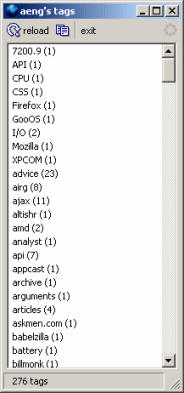
Taking a short break from working on Clippings, I immersed myself in a small project: XULicious, a simple del.icio.us tag client written using the XULRunner run-time.
XULicious (pronounced "zool-icious") lists all your del.icio.us tags. After logging in using your del.icio.us username, it loads all of your del.icio.us tags asynchronously using XMLHttpRequest. Once loaded, you can copy the entire list of tags to the clipboard. You can reload the entire list in case a change was made outside of XULicious (i.e., in the del.icio.us site itself, or from other del.icio.us clients).
And... that's it. There's a lot of things missing here that would make it more complete. There's no tag cloud option available, no ability to sort tags by frequency, no way to list all bookmarks tagged with a given tag, or filtering bookmarks by a combination of two or more tags, and all the other nice things one would find in a full-fledged del.icio.us client, like managing tags and bookmarks, posting a new bookmark, and so on.
But it has a cute little throbber icon that animates when your tags are loaded! WOW!!
All silliness aside, XULicious was meant more to be a demo of XULRunner. It took about two hours one evening to have the bare minimum functionality working (e.g. with my username/password hard-coded); and a few more hours over a span of seven days up to today to add reload and copying functionality and other UI niceities like exception handling, the Log In dialog, and of course, the toolbar icons.
Those interested in giving it a spin can download it from http://downloads.mozdev.org/clippings/misc/xulicious.
29 June 2006
Release Date Changed
To allow more time for localization to happen, the release date for Clippings 2.0 has changed. The plan is to have it released within the first two weeks of July.
25 June 2006
Localization with Babelzilla
A fellow who did the Russian localization of Clippings 1.2.1 pointed me to Babelzilla for translating Mozilla application extensions. I checked it out and wondered why I didn't know about this sooner. This is great - a whole community of translators eager and ready to localize submitted extensions! It sure beats waiting until somebody grabs the offical release of a Firefox or Thunderbird (or other Mozilla app) extension, localizes it and then submits it - a process that could take days if not weeks after the official release.
With Clippings 2.0 ready to go (only one minor fix was needed), I registered on to Babelzilla and uploaded the XPI file. It'll be interesting to see the community effort involved in the translations that will be made available, not to mention how long it'll take. With Clippings being made available in a number of different languages, it will truly benefit people the world over.
With Clippings 2.0 ready to go (only one minor fix was needed), I registered on to Babelzilla and uploaded the XPI file. It'll be interesting to see the community effort involved in the translations that will be made available, not to mention how long it'll take. With Clippings being made available in a number of different languages, it will truly benefit people the world over.
20 June 2006
Clippings 2.0 Release Candidate 1
This release candidate is now available for download. Barring any last-minute showstopper bugs, this release should resemble the final 2.0 release. Download link:
Clippings 2.0 RC 1 (62 KB; English-US; compatible with Firefox 1.5-1.5.0.x and Thunderbird 1.5-1.5.0.x)
As this is not the final 2.0 release, no automatic updating will occur if you already have Clippings 1.x or any previous development snapshot release installed. You must uninstall the old version of Clippings first in Extension Manager before installing this release.
Summary of New Features
Due to problems with getting many of the new features to work with Firefox 1.0.x and Thunderbird 1.0.x, Clippings now requires Firefox 1.5 or newer and Thunderbird 1.5 or newer. Users who have not yet upgraded to the latest versions of Firefox and Thunderbird should do so.
What's Next?
Clippings 2.0 is scheduled to be released at the end of June. If you discover any bugs, please file them in Bugzilla. Be sure to do a search first to see if the issue hasn't been reported yet. Thanks for trying out Clippings!
Clippings 2.0 RC 1 (62 KB; English-US; compatible with Firefox 1.5-1.5.0.x and Thunderbird 1.5-1.5.0.x)
As this is not the final 2.0 release, no automatic updating will occur if you already have Clippings 1.x or any previous development snapshot release installed. You must uninstall the old version of Clippings first in Extension Manager before installing this release.
Summary of New Features
- Now works with Mozilla Thunderbird! Clippings can be created from both the message view and the message compose windows by dragging selected text into the Clippings icon on the Thunderbird status bar. Clippings can also be inserted into the body of an email message in the message compose window using the context menu.
- Folders and subfolders to organize your clippings. You can choose which folder to place a new clipping in, create new folders (or delete folders you no longer need), and move or copy clippings into folders in Clippings Manager.
- Automatic back up of Clippings data. Back up files are stored in a ".clipbak" folder in your Firefox user profile folder.
- Automatic recovery of corrupted Clippings data. Clippings can now detect corruption of the data source file (clipdat2.rdf) and restore it from backup files.
- Export Clippings as HTML for printing or display in a Web browser.
- Export as Clippings 1.x format, for backwards compatibility with Clippings 1.x series.
- Clippings Manager window dimensions now remembered between sessions.
- Numerous bug fixes.
Due to problems with getting many of the new features to work with Firefox 1.0.x and Thunderbird 1.0.x, Clippings now requires Firefox 1.5 or newer and Thunderbird 1.5 or newer. Users who have not yet upgraded to the latest versions of Firefox and Thunderbird should do so.
What's Next?
Clippings 2.0 is scheduled to be released at the end of June. If you discover any bugs, please file them in Bugzilla. Be sure to do a search first to see if the issue hasn't been reported yet. Thanks for trying out Clippings!
03 June 2006
Clippings Data Loss Problems, and Open Source
One of the bug fixes that is in the 1.99.6 development snapshot release (see previous post) includes removing control characters (ASCII codes 0 - 31 and 127, excluding 10 and 13 to permit line breaks) in clippings entries before they are added to the RDF data source in which Clippings are stored (CVS diff).
This should hopefully reduce, if not eliminate, the annoying data loss problems that have been reported by many users. Based on communication with the author of another Firefox extension - ScrapBook, which has a "notes" feature which is similar in scope to Clippings - garbage control characters in RDF string literals seems to be the culprit of many RDF data source corruption problems.
A tenet of open source is being able to share (or, in this case, obtain) source code and ideas like this with (or from) others without being constrained or barred by patents, non-disclosure agreements, or just the selfish desire to withhold knowledge, discoveries and wisdom in the interest of beating the competition and maximizing profits.
But it's not just developers helping each other out. End users can also help out in development efforts by reporting bugs and assisting in troubleshooting difficult problems. I am grateful for a few Clippings users who took the time and effort to assist in troubleshooting the data loss problems, getting back to me by email on my questions and them offering a few constructive suggestions of their own. This can only serve to make Clippings a better, stronger product for everyone.
I resent those few users out there leaving behind slanderous, sensational and meaningless comments like "worthless," "not ready for prime time!" and "needs more work" on the feedback page for Clippings on addons.mozilla.org. These are the same users who do not offer any details - like Firefox version, which OS they're using, whether Firefox crashed when their Clippings data was lost, and so on - that could help in pinpointing the cause. Comments by such users do nothing to help improve Clippings, and it's interesting that so much time and effort is expended in telling the world that "Clippings sucks." These users will not be missed.
This should hopefully reduce, if not eliminate, the annoying data loss problems that have been reported by many users. Based on communication with the author of another Firefox extension - ScrapBook, which has a "notes" feature which is similar in scope to Clippings - garbage control characters in RDF string literals seems to be the culprit of many RDF data source corruption problems.
A tenet of open source is being able to share (or, in this case, obtain) source code and ideas like this with (or from) others without being constrained or barred by patents, non-disclosure agreements, or just the selfish desire to withhold knowledge, discoveries and wisdom in the interest of beating the competition and maximizing profits.
But it's not just developers helping each other out. End users can also help out in development efforts by reporting bugs and assisting in troubleshooting difficult problems. I am grateful for a few Clippings users who took the time and effort to assist in troubleshooting the data loss problems, getting back to me by email on my questions and them offering a few constructive suggestions of their own. This can only serve to make Clippings a better, stronger product for everyone.
I resent those few users out there leaving behind slanderous, sensational and meaningless comments like "worthless," "not ready for prime time!" and "needs more work" on the feedback page for Clippings on addons.mozilla.org. These are the same users who do not offer any details - like Firefox version, which OS they're using, whether Firefox crashed when their Clippings data was lost, and so on - that could help in pinpointing the cause. Comments by such users do nothing to help improve Clippings, and it's interesting that so much time and effort is expended in telling the world that "Clippings sucks." These users will not be missed.
Clippings 1.99.6 Released
This release fixes some bugs present in 1.99.5, which was released on 27 May 2006 (just a week ago!), and introduces integration with Mozilla Thunderbird.
If you already have Clippings 1.x or any previous development snapshot release installed, you must uninstall it first before installing this release.
Download link: http://downloads.mozdev.org/clippings/devel/clippings-1.99.6-en-US.xpi (62 KB; English-US; compatible with Firefox 1.5 - 1.5.0.x and Thunderbird 1.5-1.5.0.x)
All development snapshots to date can be found here: http://downloads.mozdev.org/clippings/devel/
Much effort has been made at finding and fixing bugs; however, this release is still rough around the edges, and ordinary users not comfortable trying out new software should stay with the current stable release, or wait until Clippings 2.0 is out.
What's New
Due to problems with getting many of the new features to work with Firefox 1.0.x and Thunderbird 1.0.x, Clippings now requires Firefox 1.5 or newer and Thunderbird 1.5 or newer. Users who have not yet upgraded to the latest versions of Firefox and Thunderbird should do so.
Known Issues
Please follow the usual process for bug reporting. Thanks for trying out Clippings.
If you already have Clippings 1.x or any previous development snapshot release installed, you must uninstall it first before installing this release.
Download link: http://downloads.mozdev.org/clippings/devel/clippings-1.99.6-en-US.xpi (62 KB; English-US; compatible with Firefox 1.5 - 1.5.0.x and Thunderbird 1.5-1.5.0.x)
All development snapshots to date can be found here: http://downloads.mozdev.org/clippings/devel/
Much effort has been made at finding and fixing bugs; however, this release is still rough around the edges, and ordinary users not comfortable trying out new software should stay with the current stable release, or wait until Clippings 2.0 is out.
What's New
- Now works with Mozilla Thunderbird! Clippings can be created from both the message view and the message compose windows by dragging selected text into the Clippings icon on the Thunderbird status bar. Clippings can also be inserted into the body of an email message in the message compose window, using the context menu.
- Bug fix: Clippings Manager item count remains as 1 when all items have been deleted.
- Bug fix: Imported folders do not show up in Clippings menu.
Due to problems with getting many of the new features to work with Firefox 1.0.x and Thunderbird 1.0.x, Clippings now requires Firefox 1.5 or newer and Thunderbird 1.5 or newer. Users who have not yet upgraded to the latest versions of Firefox and Thunderbird should do so.
Known Issues
- Folders do not appear on Clippings menu after they are created from Clippings Manager unless a new window is opened (regression).
Please follow the usual process for bug reporting. Thanks for trying out Clippings.
Subscribe to:
Posts (Atom)