Over the summer, it was announced that the Mozilla Thunderbird project would be spun off into a new, separate organizational structure. Then, earlier this month, the lead Thunderbird developer, Scott McGregor, suddenly announced his departure from the Mozilla Corporation. This unexpected announcement was then followed two days later with news from David Bienvenu, another prominent Thunderbird developer, that he too was leaving.
In their respective blog postings where they briefly announced their resignations, both have stated that they will continue working on the Thunderbird project. Nonetheless I'm skeptical of their ability to retain their focus on the continued development of the Thunderbird email client, especially since they're moving on to other endeavours. With them pursuing their new venture (according to David Ascher's open letter to the Thunderbird community), how could they possibly maintain the same level of effort on Thunderbird like they used to? Unless their new "venture" somehow involves Thunderbird, but very little has been revealed as to what they'll be pursing next.
I've read a lot about these recent events with great interest, and it's interesting to read the speculative reasons for the departures and the negative "doom and gloom"-type predictions; case in point: right now Mozilla Links has a reader survey up, asking if the two key departures signify "the end of Thunderbird." While I can't help but wonder if there is a deeper, undisclosed reason for these two developers leaving, perhaps these departures -- as well as the spin-off from the Mozilla Corp -- is an opportunity for the Thunderbird project to reinvigorate itself with fresh ideas and evolve further from what it is right now.
How? Being the open source project that it is, there are people all over the world either volunteering their time, efforts and talents into the ongoing development and testing of Thunderbird, or are paid to do so by other companies (Red Hat, Google, IBM, et. al.) that hire them to do their work. As long as there is interest and motivation in improving Thunderbird, as well as the number of end users justifying the effort at doing so, there will be people who will be passionate and dedicated enough to step forward and make it so. And with the new, separate organization focusing entirely on the email client, the unavoidable distractions that come with supporting other, non-mail projects should be eliminated.
I admit that Clippings wasn't originally intended to be compatible with Thunderbird; I had designed and coded it with Firefox in mind. As a Thunderbird user, it never struck me as the slick, polished application that Firefox is; even with version 2, I still regard Thunderbird as nothing more than the mail and news component split off from the original Mozilla 1.x suite. But compare that with Firefox... much effort has been put into making it the most user-friendly open source application thus far (although I have heard a lot of good things about Ubuntu...), and Firefox 3 promises to be another great leap forward into making Web browsing even more easier, efficient and fun -- for both end users and developers.
Hopefully we will soon see the same with Thunderbird.
18 October 2007

08 October 2007
Clippings 2.99.3 development snapshot released
This is the third development milestone leading up to Clippings 3.0, intended for early adopter users who crave the latest and greatest. Users not comfortable trying out pre-release software and tolerating its many bugs should stick with Clippings 2.6 for now.
» Download: Clippings 2.99.3 (128 KB; English (United States); compatible with Firefox 1.5-2.0.0.x and Thunderbird 1.5-2.0.0.x)
If you already have a previous release of Clippings installed, you must uninstall it first before installing this release. Because this is a development snapshot, no automatic upgrades to this release will be available to current Clippings users.
What's New in This Release
Known Issues
For the most up-to-date list of bugs, please see http://clippings.mozdev.org/bugs.html.
Other Things You Should Know About
The function key for Clippings Manager's Redo command (a.k.a., "Reverse Last Undo," "Undo Last Command" or - my personal favourite - "Undo Undo") has changed. Prior to this release it was F4. Because that key is in conflict with the shortcut key for invoking the menu in the new Shortcut Key drop-down field, the function key for Undo Undo has been changed to F2.
Help and Support
Send your questions to the Clippings mailing list at clippings mozdev
 org. Enter a new bug here (Bugzilla account on Mozdev required - or you can just post your bug report to the mailing list). Remember to check the bug list first to see if an issue you want to report has already been filed.
» Download: Clippings 2.99.3 (128 KB; English (United States); compatible with Firefox 1.5-2.0.0.x and Thunderbird 1.5-2.0.0.x)
If you already have a previous release of Clippings installed, you must uninstall it first before installing this release. Because this is a development snapshot, no automatic upgrades to this release will be available to current Clippings users.
What's New in This Release
- Default clippings. System administrators and redistributors who want to package the Clippings XPI with default clippings can do so by unzipping the XPI archive using a ZIP client such as WinZip, putting the data source file containing the default clippings in the "defaults" directory, and then re-zipping the archive. The data source file must be named "clippak.rdf", and must be a valid Clippings file. Hint: Create and organize the default clippings using Clippings Manager, and then export the data to a Clippings file.
- The predefined clipping variable
$[HOSTAPP]now includes the host application's version number. - On-the-fly updating of clipping edits/changes.
- Automatic refreshing of Clippings Manager's display whenever its window is focused. This is especially important when common Clippings data is enabled, because this ensures that the most recent changes from the other host application is reflected in Clippings Manager.
- Improvements to the new common data source feature, which was introduced in the last development snapshot.
Known Issues
For the most up-to-date list of bugs, please see http://clippings.mozdev.org/bugs.html.
- Common clippings is still disabled by default; please read this blog post for instructions on how to enable it. This issue will be addressed in the next development snapshot release.
- The Clippings menu in Firefox's textbox context menu may not appear if the default clipping file is corrupted or not recognized as a valid Clippings file (bug 17898)
- Clippings Manager's status bar item count is sometimes incorrect; this can happen when either a new clipping/folder from another host app is created, or when a clipping file is imported from another host app. This bug occurs when common clippings is enabled (bug 17871)
Other Things You Should Know About
The function key for Clippings Manager's Redo command (a.k.a., "Reverse Last Undo," "Undo Last Command" or - my personal favourite - "Undo Undo") has changed. Prior to this release it was F4. Because that key is in conflict with the shortcut key for invoking the menu in the new Shortcut Key drop-down field, the function key for Undo Undo has been changed to F2.
Help and Support
Send your questions to the Clippings mailing list at clippings
mozdevorg. Enter a new bug here (Bugzilla account on Mozdev required - or you can just post your bug report to the mailing list). Remember to check the bug list first to see if an issue you want to report has already been filed.
04 September 2007
Clippings featured in Linux.com article
Clippings was among the five extensions described in an article on Linux.com:
“As the name suggests, the Clippings extension allows you to save text snippets and quickly insert them into a message, which can save you a lot of typing. To create a new snippet, select the desired text fragment, right-click on it, and choose Clippings -> New From Selection. Alternatively, you can evoke the Clippings Manager by clicking on the Clippings icon in the lower right corner of Thunderbird's main window. You can then create a new clipping from scratch (press the New Clipping button), or from the text in the Clipboard (press Options and choose New From Clipboard). The Clippings Manager also allows you to edit the existing clippings and organize them into folders. Better yet, using the Options button, you can easily export and import your clippings, which can come in handy if you use Thunderbird on multiple machines, or you want to share clippings with other users.”Click here to read the full article.
30 August 2007
More about the Clippings 2.99.2 development snapshot
As promised, here are more details on the new features introduced in the latest pre-3.0 development snapshot.
Placeholders In Clippings
You can now define placeholders inside a clipping that you will be prompted to fill in when you paste the clipping. Placeholders are essentially variables that appear in the clipping text in the format $[variable_name]. Valid variable names can contain letters (lowercase or uppercase), digits (0-9) and underscores. Example clipping with placeholders:
There are six predefined placeholders you can use in your clippings; these predefined placeholders will be automatically substituted with their expected values when you paste the clipping.
Toolbar Button for Firefox
To add this button to a toolbar in the Firefox browser window, right-click on a toolbar and choose Customize, then from the toolbar button pallete drag the Clippings button to the desired location.
Common Clippings Data for Firefox and Thunderbird
This much-requested feature allows your Clippings data to be created, accessed and modified from both Firefox and Thunderbird. That means that a clipping created in Firefox will be visible in Thunderbird; a clipping created in Firefox that is modified in Thunderbird will be updated in Firefox, too; etc.
This feature is still a work in progress with lots of bugs, and is therefore turned off by default. If you want to test this feature, be sure to familiarize yourself with the list of known issues in the post announcing the release of this milestone and the latest bug list from the Clippings website.
To enable common clippings for both host applications (Firefox and Thunderbird):
Sometimes the tree list of clippings and folders in Clippings Manager may not be updated with the latest changes from the other host app. To refresh the display, choose Options -> Reload. (This command appears on the Options menu only if
Placeholders In Clippings
You can now define placeholders inside a clipping that you will be prompted to fill in when you paste the clipping. Placeholders are essentially variables that appear in the clipping text in the format $[variable_name]. Valid variable names can contain letters (lowercase or uppercase), digits (0-9) and underscores. Example clipping with placeholders:
Hello, $[YourName], I'm glad you're coming to the club meeting at $[meeting_time]. See you $[2nite]!When you paste a clipping with placeholders, you will be prompted to fill in the value for each placeholder in the clipping. If you want the placeholders in the clipping pasted exactly as they are, with no prompting and substitution, the clipping name should be prefixed with [NOSUBST].
There are six predefined placeholders you can use in your clippings; these predefined placeholders will be automatically substituted with their expected values when you paste the clipping.
- $[NAME] - the name of the clipping
- $[FOLDER] - the name of the folder the clipping belongs to
- $[DATE] - the current date, expressed in the format defined in your system's locale settings
- $[TIME] - the current time, expressed in the format defined in your system's locale settings
- $[HOSTAPP] - the name of the host application you're pasting the clipping in
- $[UA] - the user agent string of the host application
Toolbar Button for Firefox
To add this button to a toolbar in the Firefox browser window, right-click on a toolbar and choose Customize, then from the toolbar button pallete drag the Clippings button to the desired location.
Common Clippings Data for Firefox and Thunderbird
This much-requested feature allows your Clippings data to be created, accessed and modified from both Firefox and Thunderbird. That means that a clipping created in Firefox will be visible in Thunderbird; a clipping created in Firefox that is modified in Thunderbird will be updated in Firefox, too; etc.
This feature is still a work in progress with lots of bugs, and is therefore turned off by default. If you want to test this feature, be sure to familiarize yourself with the list of known issues in the post announcing the release of this milestone and the latest bug list from the Clippings website.
To enable common clippings for both host applications (Firefox and Thunderbird):
- Download and install this release of Clippings in both host apps.
- Export your clippings from both host apps. You can skip this step if you've never used Clippings before, or want to start from scratch.
- Create a new boolean pref in about:config named
clippings.datasource.commonand set it totrue. Do this for both host apps. - Exit both host apps and restart them.
- In one of the two host apps, open Clippings Manager, then import the clippings you had exported in step 2 (Options -> Import).
- Switch to the other host app, and from there either right-click on a text box or open Clippings Manager. You should now see the imported clippings from the other host app.
Sometimes the tree list of clippings and folders in Clippings Manager may not be updated with the latest changes from the other host app. To refresh the display, choose Options -> Reload. (This command appears on the Options menu only if
clippings.datasource.common is enabled.)
29 August 2007
Clippings 2.99.2 development snapshot released
This is the second development milestone leading up to Clippings 3.0, intended for early adopter users who crave the latest and greatest. Users not comfortable trying out pre-release software and tolerating its many bugs should stick with Clippings 2.6 for now.
» Download: Clippings 2.99.2 (120 KB; English (United States); compatible with Firefox 1.5-2.0.0.x and Thunderbird 1.5-2.0.0.x)
If you already have a previous release of Clippings installed, you must uninstall it first before installing this release. Because this is a development snapshot, no automatic upgrades to this release will be available to current Clippings users.
What's New in This Release
Here is a summary of the new features in this release. More information on these new features will be posted to this blog soon.
For the most up-to-date list of bugs, please see http://clippings.mozdev.org/bugs.html.
Help and Support
Send your questions to the Clippings mailing list at clippingsmozdevorg. Enter a new bug here (Bugzilla account on Mozdev required - or you can just post your bug report to the mailing list). Remember to check the bug list first to see if an issue you want to report has already been filed.
» Download: Clippings 2.99.2 (120 KB; English (United States); compatible with Firefox 1.5-2.0.0.x and Thunderbird 1.5-2.0.0.x)
If you already have a previous release of Clippings installed, you must uninstall it first before installing this release. Because this is a development snapshot, no automatic upgrades to this release will be available to current Clippings users.
What's New in This Release
Here is a summary of the new features in this release. More information on these new features will be posted to this blog soon.
- Clipping placeholders. You can now define placeholders inside a clipping that you will be prompted to fill in when you paste the clipping.
- Toolbar button for Firefox.
- Common clippings data for Firefox and Thunderbird. There are a lot of bugs affecting this much-requested feature that can render it unusable; consequently this feature has been disabled by default. More details (like how to turn it on) will be forthcoming.
For the most up-to-date list of bugs, please see http://clippings.mozdev.org/bugs.html.
- Undoing deletion of a clipping with a shortcut key assigned to it will not restore its shortcut key. It is also not yet possible to undo a shortcut key assignment in Clippings Manager (bug 17531).
- Clippings Manager doesn't immediately update the shortcut key assignment on a newly-created clipping, if it was created via the New Clipping dialog box (bug 17467).
- Clippings Manager problems with Options -> Reload: repeated invocations will cause folder icons for empty folders to change to a clipping icon and then back to folder images. Also, unwanted undoing of editing actions when invoking Reload (bug 17669)
- Subfolders sometimes don't appear in the Clippings menu when common Clippings data is enabled; the Clippings menu needs to be invoked repeatedly to have all subfolders (empty and non-empty) appear (bug 17413).
- Shortcut key doesn't work immediately after assignment in Clippings Manager (bug 17673)
Help and Support
Send your questions to the Clippings mailing list at clippings
mozdevorg. Enter a new bug here (Bugzilla account on Mozdev required - or you can just post your bug report to the mailing list). Remember to check the bug list first to see if an issue you want to report has already been filed.
15 August 2007
Clippings 2.99.1 development snapshot released
Despite the seemingly long quietness that has descended on this blog, much has been going on behind the scenes... well, in the past month, anyway... =P
This release is the first development milestone towards version 3.0. Unlike official "stable" releases like version 2.6 (the most recent one), version 2.99.1 (and others numbered 2.99.x) will contain bugs and there is a risk that your Clippings data may be lost or corrupted as a result. If that scares you, or if you're not an early adopter who craves the latest and greatest and you're not willing to tolerate bugs, then stick with Clippings 2.6 for now.
» Download: Clippings 2.99.1 (117 KB; English (United States); compatible with Firefox 1.5-2.0.0.x and Thunderbird 1.5-2.0.0.x)
If you already have a previous release of Clippings installed, you must uninstall it first before installing this release. Because this is a development snapshot, no automatic upgrades to this release will be available to current Clippings users.
What's New
Known Issues
Send your questions to the Clippings mailing list at clippingsmozdevorg.
If you find a bug, check the above Known Issues list first, and then do a bug search to ensure that it has not been already reported. If you have a Bugzilla account on Mozdev, you may file a bug report; if not you may simply post your bug report to the Clippings mailing list.
This release is the first development milestone towards version 3.0. Unlike official "stable" releases like version 2.6 (the most recent one), version 2.99.1 (and others numbered 2.99.x) will contain bugs and there is a risk that your Clippings data may be lost or corrupted as a result. If that scares you, or if you're not an early adopter who craves the latest and greatest and you're not willing to tolerate bugs, then stick with Clippings 2.6 for now.
» Download: Clippings 2.99.1 (117 KB; English (United States); compatible with Firefox 1.5-2.0.0.x and Thunderbird 1.5-2.0.0.x)
If you already have a previous release of Clippings installed, you must uninstall it first before installing this release. Because this is a development snapshot, no automatic upgrades to this release will be available to current Clippings users.
What's New
- Shortcut keys. You can now define a shortcut key (a single letter or digit) for a new or existing clipping. To quickly paste a clipping into a form field in a Web page in Firefox or an email message in Thunderbird, press CTRL+ALT+V, followed by its shortcut key.
Known Issues
- Undoing deletion of a clipping with a shortcut key assigned to it will not restore its shortcut key. It is also not yet possible to undo a shortcut key assignment in Clippings Manager (bug 17531).
- Clippings Manager doesn't immediately update the shortcut key assignment on a newly-created clipping, if it was created via the New Clipping dialog box (bug 17467).
Send your questions to the Clippings mailing list at clippings
mozdevorg.If you find a bug, check the above Known Issues list first, and then do a bug search to ensure that it has not been already reported. If you have a Bugzilla account on Mozdev, you may file a bug report; if not you may simply post your bug report to the Clippings mailing list.
13 April 2007
Clippings 2.6 released
This release introduces a few new features for Thunderbird, and is compatible with Thunderbird 2.0 release candidate 1.
Users who had first installed Clippings from the Clippings website will be able to upgrade immediately. Clippings is awaiting review on Mozilla Addons, so users who first installed Clippings from there will not see updates for it until it is approved by Mozilla Addons reviewers.
What's New
A Quick Start Guide is available for first-time users. See http://clippings.mozdev.org/help.html.
Support requests should be emailed to the Clippings mailing list at clippingsmozdevorg. If you think you found a bug, please do a search first to see if the issue hasn't been reported yet. Bug reports can be emailed to the Clippings mailing list; or if you have a Bugzilla account on Mozdev, you may file a bug report at http://clippings.mozdev.org/bugs.html.
Clippings 2.6 is now available for download from the Clippings website, http://clippings.mozdev.org, or from the download link below:
» Clippings 2.6 (109 KB; compatible with Firefox 1.5-2.0.0.* and Thunderbird 1.5-2.0rc1)
Supported Languages: English (United States), Chinese (traditional and simplified), Croatian, Dutch, French, German, Hungarian, Italian, Russian, Slovak, Spanish, Ukrainian. NOTE: In a few locales, some dialog box text may not be fully translated and may appear in English instead.
If you already have Clippings installed, it will be upgraded for you if automatic extension updates are enabled. Otherwise, choose Tools | Add-ons, then right-click on the entry for Clippings in the list of installed extensions and choose Find Update.Users who had first installed Clippings from the Clippings website will be able to upgrade immediately. Clippings is awaiting review on Mozilla Addons, so users who first installed Clippings from there will not see updates for it until it is approved by Mozilla Addons reviewers.
What's New
This release adds new Thunderbird-specific options for removing extra line breaks and quote symbols when creating new clippings. Two check boxes are added to the New Clipping dialog box:
- Create as unquoted text - If the selected text contains message quote symbols (">" for plain text messages), the new clipping is created without the quote symbols.
- Remove extra line breaks - Creates the new clipping with unnecessary line breaks removed. Spacing between paragraphs are preserved.
Also for Thunderbird, you can choose to have clippings pasted into the email compose window as plain (normal) text or quoted text. To enable this feature, right-click on the Clippings status bar icon and choose Show Options When Pasting.
Getting HelpA Quick Start Guide is available for first-time users. See http://clippings.mozdev.org/help.html.
Support requests should be emailed to the Clippings mailing list at clippings
mozdevorg. If you think you found a bug, please do a search first to see if the issue hasn't been reported yet. Bug reports can be emailed to the Clippings mailing list; or if you have a Bugzilla account on Mozdev, you may file a bug report at http://clippings.mozdev.org/bugs.html.
30 March 2007
Yahoo! Mail APIs
Big news from Yahoo! - Web APIs (SOAP- and JSON-RPC-based) are now available for their Yahoo! Mail service. As a Yahoo! Mail user, I can see how useful it can be to give third-party developers the ability to create new apps that lets users access and compose emails through interesting and different ways.
A few ideas quickly came to mind:
Considering that I am not a Yahoo! Mail Plus user, and that such a limitation shuts out an entire class of end users that are happy with their basic Yahoo! Mail account and are not interested in paying for unneeded extras, perhaps the best that I can accomplish with this for the broadest range of users is a little desktop (web-based or otherwise) utility that tells the users how many unread messages he has.
And I'm not the least bit motivated by the $10 commission for referring users to Yahoo! Mail Plus - I'm a programmer, not a salesman.
Update - apparently, someone has already written a Yahoo! Mail notifier extension.
A few ideas quickly came to mind:
- a mini email client implemented as a Firefox extension or a desktop app
- a mini email client implemented as an app/widget/module/flake/doohickey for web-based portals and desktop environments like Netvibes, Pageflakes, eyeOS and YouOS
- a mini-email client that would be available to users of my Send Tab URLs extension so that users can send a list of browser tab URLs via Yahoo! Mail (and thus overcoming the annoying limitation on Windows of not being able to support every email client)
Considering that I am not a Yahoo! Mail Plus user, and that such a limitation shuts out an entire class of end users that are happy with their basic Yahoo! Mail account and are not interested in paying for unneeded extras, perhaps the best that I can accomplish with this for the broadest range of users is a little desktop (web-based or otherwise) utility that tells the users how many unread messages he has.
And I'm not the least bit motivated by the $10 commission for referring users to Yahoo! Mail Plus - I'm a programmer, not a salesman.
Update - apparently, someone has already written a Yahoo! Mail notifier extension.
31 January 2007
Clippings 2.5.1 and Send Tab URLs 0.4
Two releases! Clippings 2.5.1 and Send Tab URLs 0.4 are now available for download. You can download them from the new AE Creations web site on mozdev.org, or you can download them from the following links:
Check out http://aecreations.mozdev.org, which will host info and download/install links for all Firefox extensions. Clippings info and downloads will continue to be available from the main Clippings web site.
- Download: Clippings 2.5.1 (101 KB; compatible with Firefox 1.5-2.0.0.* and Thunderbird 1.5-2.0b2)
Supported Languages: English (United States), Chinese (traditional and simplified), Croatian, Dutch, French, German, Hungarian, Italian, Russian, Slovak, Spanish, Ukrainian. - Download: Send Tab URLs 0.4 (18 KB; compatible with Firefox 1.5-2.0.0.*)
Supported Languages: English (United States), Dutch, French, German, Italian, Korean, Portuguese (Brazil), Russian.
Check out http://aecreations.mozdev.org, which will host info and download/install links for all Firefox extensions. Clippings info and downloads will continue to be available from the main Clippings web site.
30 December 2006
Send Tab URLs 0.3 released
This new release includes the proposed new features that was blogged about in the last post. Here is the download link:
Download: sendtabs-0.3.xpi (12 KB; English (United States); compatible with Firefox 1.5-2.0.0.*)
At the risk of sounding like a broken record... Send Tab URLs has been tested and confirmed to be fairly stable on Linux. It has not been tested on Mac OS and therefore cannot be guaranteed to work on that platform. There are limitations on supporting email apps on Windows; see the post for the December 24/06 release (version 0.2) for more info.
What is Send Tab URLs?
Send Tab URLs is an extension for Mozilla Firefox. It adds a new menu item to the File menu in the main browser window named "Send Tab URLs". When selecting this command, an email will be automatically created which lists the URLs of all the open browser tabs. This is great for those situations where you want to share someone the URLs of all the open browser tabs.
About This Release
 When invoking Send Tab URLs from the File menu, you'll be presented with a choice of list styles for the email. This dialog box is also accessible from the Add-ons window (Tools → Add-ons in Firefox); in the list of extensions choose Send Tab URLs and click Options.
Starting with this release, Send Tab URLs is limited to listing the URLs of up to 24 browser tabs in the current window. This limit is configurable via a pref setting,
What's Next
The immediate goal is to have Send Tab URLs localized in other languages (sounds like a job for Babelzilla...) Other plans are:
Once I have this extension translated in a few languages, it will be uploaded to Mozilla Addons for general availability. Still need to decide if I need to have this extension restricted to Linux given that its support for Windows-based email apps is limited and that it hasn't been tested on Mac OS X.
Test Send Tab URLs on Firefox for Max OS X.
Feedback on Send Tab URLs is welcome as work progresses on this Firefox extension. Please submit your feedback and suggestions by clicking the comment link below, or email me at aengaecreationsgmailcom.
Download: sendtabs-0.3.xpi (12 KB; English (United States); compatible with Firefox 1.5-2.0.0.*)
At the risk of sounding like a broken record... Send Tab URLs has been tested and confirmed to be fairly stable on Linux. It has not been tested on Mac OS and therefore cannot be guaranteed to work on that platform. There are limitations on supporting email apps on Windows; see the post for the December 24/06 release (version 0.2) for more info.
What is Send Tab URLs?
Send Tab URLs is an extension for Mozilla Firefox. It adds a new menu item to the File menu in the main browser window named "Send Tab URLs". When selecting this command, an email will be automatically created which lists the URLs of all the open browser tabs. This is great for those situations where you want to share someone the URLs of all the open browser tabs.
About This Release
 When invoking Send Tab URLs from the File menu, you'll be presented with a choice of list styles for the email. This dialog box is also accessible from the Add-ons window (Tools → Add-ons in Firefox); in the list of extensions choose Send Tab URLs and click Options.
Starting with this release, Send Tab URLs is limited to listing the URLs of up to 24 browser tabs in the current window. This limit is configurable via a pref setting,
sendtabs.max_tabs, in about:config.What's Next
The immediate goal is to have Send Tab URLs localized in other languages (sounds like a job for Babelzilla...) Other plans are:
Once I have this extension translated in a few languages, it will be uploaded to Mozilla Addons for general availability. Still need to decide if I need to have this extension restricted to Linux given that its support for Windows-based email apps is limited and that it hasn't been tested on Mac OS X.
Test Send Tab URLs on Firefox for Max OS X.
Feedback on Send Tab URLs is welcome as work progresses on this Firefox extension. Please submit your feedback and suggestions by clicking the comment link below, or email me at aeng
aecreationsgmailcom.
26 December 2006
Idea scratch pad - Send Tab URLs
Ideas for the next release:
- Set a limit on the number of browser tabs whose URLs are listed, for security considerations. This limit will be configurable via a setting that can be changed in about:config, although the limit should be reasonably high enough to suit the most demanding power surfer: "24 browser tabs should be enough for everybody...."
- Simple formatting of the generated email. Each listed URL in the email could be numbered or bulleted. Formatting could be set every time Send Tab URLs is invoked, or only on demand, via an "Options" dialog box. Simple formatting should work regardless of whether the email is composed in plain text or rich text (HTML).
- Slice vegetables, bake muffins, and create the most amazing pineapple chicken chow mein dish... oops, wrong project.... =)
24 December 2006
Send Tab URLs 0.2
Just in time for Christmas, Send Tab URLs 0.2 has been released and is available for download!
Download: sendtabs-0.2.xpi (8 KB; English (United States); compatible with Firefox 1.5 - 2.0.0.*)
Send Tab URLs has been tested and confirmed to be fairly stable on Linux. It has not been tested on Mac OS and therefore cannot be guaranteed to work on that platform. There are limitations on supporting email apps on Windows; users who wish to install Send Tab URLs on Firefox for Windows should keep reading for more info.
About This Release
As blogged about previously, there are issues on Windows where the mailto URL that Send Tab URLs creates won't launch if the URL is too long. This release will now automatically detect and work properly with the following email apps on Windows:
For all other email apps, Send Tab URLs will make a "best-effort" attempt to launch the mailto URL via the system's mailto URL handler. But if the URL is too long, then the unsupported email app may not run at all.
Feedback Welcome
Feedback on Send Tab URLs is welcome as work progresses on this Firefox extension. Please submit your feedback and suggestions by clicking the comment link below.
Merry Christmas!
Download: sendtabs-0.2.xpi (8 KB; English (United States); compatible with Firefox 1.5 - 2.0.0.*)
Send Tab URLs has been tested and confirmed to be fairly stable on Linux. It has not been tested on Mac OS and therefore cannot be guaranteed to work on that platform. There are limitations on supporting email apps on Windows; users who wish to install Send Tab URLs on Firefox for Windows should keep reading for more info.
About This Release
As blogged about previously, there are issues on Windows where the mailto URL that Send Tab URLs creates won't launch if the URL is too long. This release will now automatically detect and work properly with the following email apps on Windows:
- Mozilla Thunderbird
- SeaMonkey Mail
- Outlook Express
- MS Office Outlook
For all other email apps, Send Tab URLs will make a "best-effort" attempt to launch the mailto URL via the system's mailto URL handler. But if the URL is too long, then the unsupported email app may not run at all.
Feedback Welcome
Feedback on Send Tab URLs is welcome as work progresses on this Firefox extension. Please submit your feedback and suggestions by clicking the comment link below.
Merry Christmas!
20 December 2006
Send Tab URLs 0.1.2
No, the above title isn't a typo. To make it more obvious as to what it does, the name of this Firefox extension has been tweaked a bit. The internal name will still remain as "sendtabs," as you may notice in such places as the following download link...
Download: sendtabs-0.1.2.xpi (7 KB; English (United States); compatible with Firefox 1.5 - 2.0.0.*)
Please Note: Send Tabs is under development, and is currently meant for users interested in testing it and can tolerate its many bugs. If that scares you, then you shouldn't install it.
About This Release
The quest to overcome the "mailto:" URL length limitation in Windows continues. Apparently the limitation is imposed by the XPCOM method responsible for URL handling, and is in place to prevent buffer overflow exploits involving Windows helper apps (see Mozilla bug 161357). In assessing the risk of Send Tab URLs accidentally introducing this security vulnerability, I believe that one would have to make the effort to deliberately cause a buffer overflow problem on his own system, e.g. by intentionally typing in a malformed URL in the browser's address bar. Even so, the browser would already have been compromised before Send Tab URLs is invoked. This is a different situation than an unsuspecting user clicking on a malformed "mailto:" or "telnet:" URL, which is a scenario the URL length limitation is supposed to prevent.
In this release, Send Tab URLs will check if it is running in Windows; and if so, it will execute Mozilla Thunderbird, passing to it a command-line parameter that specifies the message subject and body (on non-Windows systems, Send Tab URLs will still invoke the system "mailto:" URL handler). Send Tab URLs expects Thunderbird to be installed in the default file location; if not it will prompt you to enter the install location manually. For future invocations, Send Tab URLs remembers the install location of Thunderbird in the user pref
Future Directions
A more elegant way to detect the install path of Thunderbird -- i.e. without asking the user -- will be the goal of the next release.
Since the command-line parameters available to the Mozilla family of email clients (Thunderbird, SeaMonkey, Mozilla 1.x suite) allow a long string to specify the message subject and body, I will work on supporting those apps in Send Tab URLs. I might also look into getting Send Tab URLs to work with Outlook Express and maybe even MS Office Outlook -- but don't hold your breath just yet.
Download: sendtabs-0.1.2.xpi (7 KB; English (United States); compatible with Firefox 1.5 - 2.0.0.*)
Please Note: Send Tabs is under development, and is currently meant for users interested in testing it and can tolerate its many bugs. If that scares you, then you shouldn't install it.
About This Release
The quest to overcome the "mailto:" URL length limitation in Windows continues. Apparently the limitation is imposed by the XPCOM method responsible for URL handling, and is in place to prevent buffer overflow exploits involving Windows helper apps (see Mozilla bug 161357). In assessing the risk of Send Tab URLs accidentally introducing this security vulnerability, I believe that one would have to make the effort to deliberately cause a buffer overflow problem on his own system, e.g. by intentionally typing in a malformed URL in the browser's address bar. Even so, the browser would already have been compromised before Send Tab URLs is invoked. This is a different situation than an unsuspecting user clicking on a malformed "mailto:" or "telnet:" URL, which is a scenario the URL length limitation is supposed to prevent.
In this release, Send Tab URLs will check if it is running in Windows; and if so, it will execute Mozilla Thunderbird, passing to it a command-line parameter that specifies the message subject and body (on non-Windows systems, Send Tab URLs will still invoke the system "mailto:" URL handler). Send Tab URLs expects Thunderbird to be installed in the default file location; if not it will prompt you to enter the install location manually. For future invocations, Send Tab URLs remembers the install location of Thunderbird in the user pref
sendtabs.mailapp.installpath.thunderbird.Future Directions
A more elegant way to detect the install path of Thunderbird -- i.e. without asking the user -- will be the goal of the next release.
Since the command-line parameters available to the Mozilla family of email clients (Thunderbird, SeaMonkey, Mozilla 1.x suite) allow a long string to specify the message subject and body, I will work on supporting those apps in Send Tab URLs. I might also look into getting Send Tab URLs to work with Outlook Express and maybe even MS Office Outlook -- but don't hold your breath just yet.
17 December 2006
Create or paste clippings as quoted or unquoted text
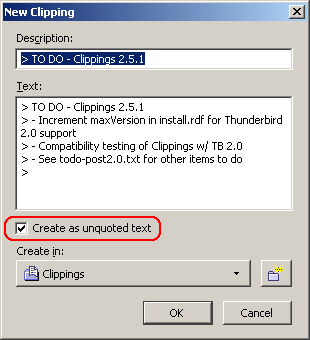
An annoyance in Clippings for Thunderbird has inspired a new feature idea.
When creating a new clipping from quoted text in a reply, one would have to manually delete the unwanted ">" symbols in the New Clipping dialog. The first part of my idea is to have a new checkbox in the New Clipping dialog, specific for Clippings for Thunderbird, to strip the leading ">" symbols on each line when creating a new clipping from quoted text. Here is a UI mockup:
 The second part of my idea is pasting clippings into the message compose window as quoted or unquoted text. This is going to be a bit challenging, as there are two issues to address:
Issue #1 promises to be an interesting exercise in user interface design. There are two ways I can think of implementing this, as both methods have their own pros and cons:
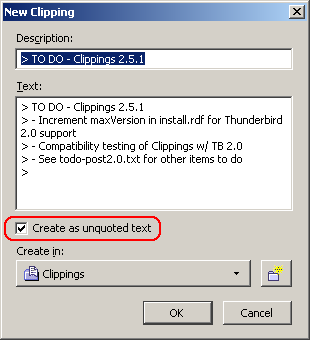
When creating a new clipping from quoted text in a reply, one would have to manually delete the unwanted ">" symbols in the New Clipping dialog. The first part of my idea is to have a new checkbox in the New Clipping dialog, specific for Clippings for Thunderbird, to strip the leading ">" symbols on each line when creating a new clipping from quoted text. Here is a UI mockup:
 The second part of my idea is pasting clippings into the message compose window as quoted or unquoted text. This is going to be a bit challenging, as there are two issues to address:
- How does the user choose to paste the clipping as quoted or unquoted text?
- If the user wants to paste the clipping as quoted text, how will Clippings know where to place the ">" symbols?
Issue #1 promises to be an interesting exercise in user interface design. There are two ways I can think of implementing this, as both methods have their own pros and cons:
- Each clipping entry on the Clippings context menu would sprout another submenu containing two commands: "Paste As Quoted" and "Paste As Unquoted."
- Pro: Very flexible option, as the choice to paste as quoted or unquoted text is right there for the user to select.
- Con: An extra wrist action is needed to select yet another level of submenus, which can prove to be painfully annoying. Users will be up in arms over sore wrists (pun unintended) brought on by Clippings. Kind of reminds me of the recent reports of repetitive strain injuries experienced by users of the Nintendo Wii remote control....
- Pro: Very flexible option, as the choice to paste as quoted or unquoted text is right there for the user to select.
- Create a toolbar button to toggle pasting clippings as quoted or unquoted text. Then, subsequent pasting of clippings as quoted or unquoted text will depend on what the user has set.
- Pro: Eliminates the need for the submenus in the first option. Very convenient when pasting multiple clippings in the same email message as quoted or unquoted text. No more sore wrists.
- Con: Not as flexible as the first option, as the user will have to ensure the option to paste as quoted or unquoted is properly set every time before pasting the clipping. If the user forgets to set the correct option, then he or she will have to undo the clippings paste action, set the correct option, and try again.
- Pro: Eliminates the need for the submenus in the first option. Very convenient when pasting multiple clippings in the same email message as quoted or unquoted text. No more sore wrists.
16 December 2006
Clippings 2.5.0+ for Thunderbird 2.0 beta 1
Now that Thunderbird 2.0 beta 1 is released, I've uploaded an experimental build of Clippings with the install manifest's maxVersion value for Thunderbird incremented to 2.0b1.
This build is being made available for testing purposes only. It is recommended that only testers, early adopters and advanced users (the same type of users who would be using a Thunderbird beta release) should download and install this experimental build of Clippings.
Download: clippings-2.5.0+.tb2-b1.xpi (102 KB; compatible with Firefox 1.5-2.0.0.* and Thunderbird 1.5-2.0b1)
Because this is a pre-release build, it will not be automatically updated in Thunderbird or Firefox. If you already have Clippings installed, you must uninstall it first, then download and install Clippings 2.5.0+.
The changes from the last stable release (Clippings 2.5) are minimal:
This build is being made available for testing purposes only. It is recommended that only testers, early adopters and advanced users (the same type of users who would be using a Thunderbird beta release) should download and install this experimental build of Clippings.
Download: clippings-2.5.0+.tb2-b1.xpi (102 KB; compatible with Firefox 1.5-2.0.0.* and Thunderbird 1.5-2.0b1)
Because this is a pre-release build, it will not be automatically updated in Thunderbird or Firefox. If you already have Clippings installed, you must uninstall it first, then download and install Clippings 2.5.0+.
The changes from the last stable release (Clippings 2.5) are minimal:
- Support for Thunderbird 2.0 beta 1
- Prevent potential JS variable redefinition errors (bug 16029).
14 December 2006
Send Tabs 0.1.1
New release. Lots of internal code changes, but only minor obvious visual changes.
Download: sendtabs-0.1.1 (6 KB; English (United States); compatible with Firefox 1.5 - 2.0.0.*)
Please Note: Send Tabs is under development, and is currently meant for users interested in testing it and can tolerate its many bugs. If that scares you, then you shouldn't install it.
What's New
A single, trivial change - the email subject line will show you how many links are being sent. So if you had 8 browser tabs open, then the subject line will read: "From Send Tabs (8 links)".
Known Issues
On Windows, Send Tabs won't work if the total number of characters in the "mailto" URL exceeds approximately 462 characters. Testing has confirmed that this isn't an issue on Linux (Fedora Core 4, at least), where 24 browser tabs were opened in a single window and a 5232-character "mailto" URL was successfully generated.
Download: sendtabs-0.1.1 (6 KB; English (United States); compatible with Firefox 1.5 - 2.0.0.*)
Please Note: Send Tabs is under development, and is currently meant for users interested in testing it and can tolerate its many bugs. If that scares you, then you shouldn't install it.
What's New
A single, trivial change - the email subject line will show you how many links are being sent. So if you had 8 browser tabs open, then the subject line will read: "From Send Tabs (8 links)".
Known Issues
On Windows, Send Tabs won't work if the total number of characters in the "mailto" URL exceeds approximately 462 characters. Testing has confirmed that this isn't an issue on Linux (Fedora Core 4, at least), where 24 browser tabs were opened in a single window and a 5232-character "mailto" URL was successfully generated.
Subscribe to:
Posts (Atom)