30 December 2006

Send Tab URLs 0.3 released

This new release includes the proposed new features that was blogged about in the last post. Here is the download link:

Download: sendtabs-0.3.xpi (12 KB; English (United States); compatible with Firefox 1.5-2.0.0.*)

At the risk of sounding like a broken record... Send Tab URLs has been tested and confirmed to be fairly stable on Linux. It has not been tested on Mac OS and therefore cannot be guaranteed to work on that platform. There are limitations on supporting email apps on Windows; see the post for the December 24/06 release (version 0.2) for more info.

What is Send Tab URLs?

Send Tab URLs is an extension for Mozilla Firefox. It adds a new menu item to the File menu in the main browser window named "Send Tab URLs". When selecting this command, an email will be automatically created which lists the URLs of all the open browser tabs. This is great for those situations where you want to share someone the URLs of all the open browser tabs.

About This Release

When invoking Send Tab URLs from the File menu, you'll be presented with a choice of list styles for the email. This dialog box is also accessible from the Add-ons window (Tools → Add-ons in Firefox); in the list of extensions choose Send Tab URLs and click Options.

Starting with this release, Send Tab URLs is limited to listing the URLs of up to 24 browser tabs in the current window. This limit is configurable via a pref setting, sendtabs.max_tabs, in about:config.

What's Next

The immediate goal is to have Send Tab URLs localized in other languages (sounds like a job for Babelzilla...) Other plans are:

Once I have this extension translated in a few languages, it will be uploaded to Mozilla Addons for general availability. Still need to decide if I need to have this extension restricted to Linux given that its support for Windows-based email apps is limited and that it hasn't been tested on Mac OS X.

Test Send Tab URLs on Firefox for Max OS X.

Feedback on Send Tab URLs is welcome as work progresses on this Firefox extension. Please submit your feedback and suggestions by clicking the comment link below, or email me at aeng.aecreations@gmail.com.

26 December 2006

Idea scratch pad - Send Tab URLs

Ideas for the next release:
  • Set a limit on the number of browser tabs whose URLs are listed, for security considerations. This limit will be configurable via a setting that can be changed in about:config, although the limit should be reasonably high enough to suit the most demanding power surfer: "24 browser tabs should be enough for everybody...."

  • Simple formatting of the generated email. Each listed URL in the email could be numbered or bulleted. Formatting could be set every time Send Tab URLs is invoked, or only on demand, via an "Options" dialog box. Simple formatting should work regardless of whether the email is composed in plain text or rich text (HTML).

  • Slice vegetables, bake muffins, and create the most amazing pineapple chicken chow mein dish... oops, wrong project.... =)

24 December 2006

Send Tab URLs 0.2

Just in time for Christmas, Send Tab URLs 0.2 has been released and is available for download!

Download: sendtabs-0.2.xpi (8 KB; English (United States); compatible with Firefox 1.5 - 2.0.0.*)

Send Tab URLs has been tested and confirmed to be fairly stable on Linux. It has not been tested on Mac OS and therefore cannot be guaranteed to work on that platform. There are limitations on supporting email apps on Windows; users who wish to install Send Tab URLs on Firefox for Windows should keep reading for more info.

About This Release

As blogged about previously, there are issues on Windows where the mailto URL that Send Tab URLs creates won't launch if the URL is too long. This release will now automatically detect and work properly with the following email apps on Windows:
  • Mozilla Thunderbird
  • SeaMonkey Mail
  • Outlook Express
  • MS Office Outlook
Send Tab URLs no longer asks the user for the install location of Mozilla Thunderbird, unlike the previous release.

For all other email apps, Send Tab URLs will make a "best-effort" attempt to launch the mailto URL via the system's mailto URL handler. But if the URL is too long, then the unsupported email app may not run at all.

Feedback Welcome

Feedback on Send Tab URLs is welcome as work progresses on this Firefox extension. Please submit your feedback and suggestions by clicking the comment link below.

Merry Christmas!

20 December 2006

Send Tab URLs 0.1.2

No, the above title isn't a typo. To make it more obvious as to what it does, the name of this Firefox extension has been tweaked a bit. The internal name will still remain as "sendtabs," as you may notice in such places as the following download link...

Download: sendtabs-0.1.2.xpi (7 KB; English (United States); compatible with Firefox 1.5 - 2.0.0.*)

Please Note: Send Tabs is under development, and is currently meant for users interested in testing it and can tolerate its many bugs. If that scares you, then you shouldn't install it.

About This Release

The quest to overcome the "mailto:" URL length limitation in Windows continues. Apparently the limitation is imposed by the XPCOM method responsible for URL handling, and is in place to prevent buffer overflow exploits involving Windows helper apps (see Mozilla bug 161357). In assessing the risk of Send Tab URLs accidentally introducing this security vulnerability, I believe that one would have to make the effort to deliberately cause a buffer overflow problem on his own system, e.g. by intentionally typing in a malformed URL in the browser's address bar. Even so, the browser would already have been compromised before Send Tab URLs is invoked. This is a different situation than an unsuspecting user clicking on a malformed "mailto:" or "telnet:" URL, which is a scenario the URL length limitation is supposed to prevent.

In this release, Send Tab URLs will check if it is running in Windows; and if so, it will execute Mozilla Thunderbird, passing to it a command-line parameter that specifies the message subject and body (on non-Windows systems, Send Tab URLs will still invoke the system "mailto:" URL handler). Send Tab URLs expects Thunderbird to be installed in the default file location; if not it will prompt you to enter the install location manually. For future invocations, Send Tab URLs remembers the install location of Thunderbird in the user pref sendtabs.mailapp.installpath.thunderbird.

Future Directions

A more elegant way to detect the install path of Thunderbird -- i.e. without asking the user -- will be the goal of the next release.

Since the command-line parameters available to the Mozilla family of email clients (Thunderbird, SeaMonkey, Mozilla 1.x suite) allow a long string to specify the message subject and body, I will work on supporting those apps in Send Tab URLs. I might also look into getting Send Tab URLs to work with Outlook Express and maybe even MS Office Outlook -- but don't hold your breath just yet.

17 December 2006

Create or paste clippings as quoted or unquoted text

An annoyance in Clippings for Thunderbird has inspired a new feature idea.

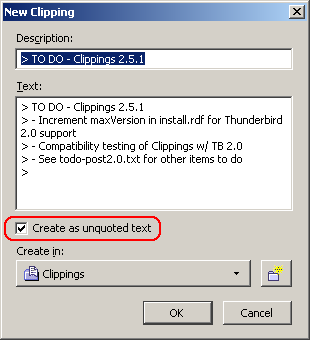
When creating a new clipping from quoted text in a reply, one would have to manually delete the unwanted ">" symbols in the New Clipping dialog. The first part of my idea is to have a new checkbox in the New Clipping dialog, specific for Clippings for Thunderbird, to strip the leading ">" symbols on each line when creating a new clipping from quoted text. Here is a UI mockup:

The second part of my idea is pasting clippings into the message compose window as quoted or unquoted text. This is going to be a bit challenging, as there are two issues to address:
  1. How does the user choose to paste the clipping as quoted or unquoted text?
  2. If the user wants to paste the clipping as quoted text, how will Clippings know where to place the ">" symbols?
Issue #2 may be easy to implement once I study the source code for Thunderbird's message compose window and learn how the Edit | Paste As Quotation command is implemented. It could be a simple matter of copying the desired clipping to the system clipboard and then invoking the Paste As Quotation command to paste the clipping as a quotation.

Issue #1 promises to be an interesting exercise in user interface design. There are two ways I can think of implementing this, as both methods have their own pros and cons:
  1. Each clipping entry on the Clippings context menu would sprout another submenu containing two commands: "Paste As Quoted" and "Paste As Unquoted."
    • Pro: Very flexible option, as the choice to paste as quoted or unquoted text is right there for the user to select.
    • Con: An extra wrist action is needed to select yet another level of submenus, which can prove to be painfully annoying. Users will be up in arms over sore wrists (pun unintended) brought on by Clippings. Kind of reminds me of the recent reports of repetitive strain injuries experienced by users of the Nintendo Wii remote control....

  2. Create a toolbar button to toggle pasting clippings as quoted or unquoted text. Then, subsequent pasting of clippings as quoted or unquoted text will depend on what the user has set.
    • Pro: Eliminates the need for the submenus in the first option. Very convenient when pasting multiple clippings in the same email message as quoted or unquoted text. No more sore wrists.
    • Con: Not as flexible as the first option, as the user will have to ensure the option to paste as quoted or unquoted is properly set every time before pasting the clipping. If the user forgets to set the correct option, then he or she will have to undo the clippings paste action, set the correct option, and try again.
Hopefully this will get some dialog started. Thoughts and suggestions are welcome in the comments below, or in the Clippings mailing list.

16 December 2006

Clippings 2.5.0+ for Thunderbird 2.0 beta 1

Now that Thunderbird 2.0 beta 1 is released, I've uploaded an experimental build of Clippings with the install manifest's maxVersion value for Thunderbird incremented to 2.0b1.

This build is being made available for testing purposes only. It is recommended that only testers, early adopters and advanced users (the same type of users who would be using a Thunderbird beta release) should download and install this experimental build of Clippings.

Download: clippings-2.5.0+.tb2-b1.xpi (102 KB; compatible with Firefox 1.5-2.0.0.* and Thunderbird 1.5-2.0b1)

Because this is a pre-release build, it will not be automatically updated in Thunderbird or Firefox. If you already have Clippings installed, you must uninstall it first, then download and install Clippings 2.5.0+.

The changes from the last stable release (Clippings 2.5) are minimal:
  • Support for Thunderbird 2.0 beta 1
  • Prevent potential JS variable redefinition errors (bug 16029).
Please test carefully and report any regressions. If you have a Bugzilla account on Mozdev, you may file a bug report at http://clippings.mozdev.org/bugs.html. General feedback should be posted in the Clippings mailing list.

14 December 2006

Send Tabs 0.1.1

New release. Lots of internal code changes, but only minor obvious visual changes.

Download: sendtabs-0.1.1 (6 KB; English (United States); compatible with Firefox 1.5 - 2.0.0.*)

Please Note: Send Tabs is under development, and is currently meant for users interested in testing it and can tolerate its many bugs. If that scares you, then you shouldn't install it.

What's New

A single, trivial change - the email subject line will show you how many links are being sent. So if you had 8 browser tabs open, then the subject line will read: "From Send Tabs (8 links)".

Known Issues

On Windows, Send Tabs won't work if the total number of characters in the "mailto" URL exceeds approximately 462 characters. Testing has confirmed that this isn't an issue on Linux (Fedora Core 4, at least), where 24 browser tabs were opened in a single window and a 5232-character "mailto" URL was successfully generated.

09 December 2006

Send Tabs 0.1

I've uploaded Send Tabs version 0.1, modified from the original for compatibility with Firefox 1.5 - 2.0.

sendtabs-0.1.xpi (3 KB; English (United States); compatible with Firefox 1.5 - 2.0.0.*)

Send Tabs works by enumerating the URLs of all open browser tabs and sending that list, along with a default email subject line, as a "mailto" URL and passing it to the "mailto" protocol handler which invokes the system default email client. It works very well until the maximum of ~462 characters (subject line + URL list combined) is exceeded; at that point you get an error.

That glaring limitation makes Send Tabs useless if you have a lot of URLs to send. The goal of the next few milestone releases is to overcome this barrier.

03 December 2006

Ideas

Picture this common Web browsing scenario: You've got multiple browser tabs open in Firefox, and you want to email a friend a list of URLs of all the really cool, must-see Web pages in the browser tabs you've got open.

While there is a "Send Link" command in Firefox (and in most other Web browsers), it only creates an email message containing the URL of the tab that was focused at the time the Send Link command was invoked. If you wanted to include the URLs of the other tabs, you would have to switch to each tab and copy and paste the URL from the location bar into the email. And if there are a lot of open tabs, that can be a real chore.

I propose an extension that would eliminate this needless copying and pasting. Called "Send Tabs," it will open an email message composition window where it will populate the message body with a bulleted list of URLs of all the Web pages displayed in all open tabs.

I had actually started working on this a while back, and got as far as creating a prototype of it before the project was abandoned when other things came up. Now, with Clippings 2.5 done and me restlessly thinking of other things to keep me busy and out of trouble, the Send Tabs idea seems to be worth revisiting.

There is some preliminary research and studying for me to do before resuming work on Send Tabs, but for now, what do you think? Comments on this idea are welcome.

15 October 2006

Clippings 2.5 released

In addition to compatibility with Firefox 2, this update contains feature enhancements and various improvements to stability, making this release the most reliable to date. Clippings 2.5 also contains added language support for Croatian, Dutch and Hungarian.

Clippings 2.5 is now available for download from the Clippings website, http://clippings.mozdev.org, or from the download link below:

clippings-2.5.xpi (101 KB; compatible with Firefox 1.5 - 2.0.0.x and Thunderbird 1.5 - 1.5.0.x)

Supported languages: English (United States), Chinese (traditional and simplified), Croatian, Dutch, French, German, Hungarian, Italian, Russian, Slovak, Spanish, Ukrainian.

If you already have Clippings installed, it will be upgraded for you if automatic extension updates are enabled in Firefox. Otherwise, open Extension Manager in Firefox, then right-click on the entry for Clippings in the list of installed extensions and choose Find Update.

What's New
  • Compatible with Firefox 2.
  • "Open Clippings Manager" command renamed to "Organize Clippings"
  • Drag and drop text from external applications into Clippings Manager's tree list to create new clippings.
  • Improvements to automatic recovery.
  • Clippings Manager now remembers the width of the tree list between sessions.
  • Various bug fixes.
Getting Help

A Quick Start Guide is available for first-time users. See http://clippings.mozdev.org/help.html.

Support requests should be emailed to the Clippings mailing list at clippings@mozdev.org. If you think you found a bug, please do a search first to see if the issue hasn't been reported yet. Bug reports can be emailed to the Clippings mailing list; or if you have a Bugzilla account on Mozdev, you may file a bug report at http://clippings.mozdev.org/bugs.html.

30 September 2006

Keeping it simple

With my work almost done on a new minor release of Clippings, my attention is turning to other projects to work on. One idea I had been floating around for some time was something related to del.icio.us. I've already created a rough prototype - a simple XULRunner app that retrieves all the user's tags for display or copying to the clipboard. The prototype app is woefully simplistic - but the couple of hours spent on it is a great way to explore some ideas.

I have noticed that there are a lot of Firefox extensions out there for integrating del.icio.us with Firefox - some of them good (like Another Delicious Sidebar), and others not so much (like VeryDelicious, which is reportedly riddled with problems, as the user comments on the Mozilla Addons page for this extension indicate).

A common task is getting a list of bookmarks tagged with a particular tag name or a combination of tag names. A Firefox extension or even an XULRunner app was considered, where there would be a text box for the user to enter a tag (e.g., "sanity") or a combination of tags (e.g., "sanity+chocolate"), and a list of del.icio.us bookmarks with the given tag(s) then appears in a list box below it. A tag browser, basically. And then there are some nice-to-have features, like jumping directly to the URL or being able to edit a bookmark - add/remove tags, change the title and URL, delete it, etc.

But then I realized that a simple browser custom keyword can do the trick. Simply create a new bookmark with the URL of the form:
http://del.icio.us/<your_delicious_userid>/%s
Substitute <your_delicious_userid> as appropriate. Give the new bookmark a keyword, e.g. "tag". Then in the browser window, just type "tag <tagname(s)>" in the location bar, and presto! The del.icio.us site loads up, with all your bookmarks tagged with the given tagname(s) listed.

So to list all bookmarks tagged with "sanity", you would type in the browser's location bar:
tag sanity
And to list all bookmarks tagged with both "sanity" and "chocolate":
tag sanity+chocolate
With such a simple solution that most adept users can implement, it's laughable that one would create an extension (or hell, a complete XULRunner app) that would do the same thing. The custom keywords feature found in Firefox, SeaMonkey, and Mozilla 1.x is sufficient enough for listing all your del.icio.us bookmarks tagged with a particular tag or tags; and the del.icio.us site itself works very well for managing your tags and bookmarks. It's all about keeping it simple - and leveraging existing solutions to solve new problems.

Update: Apparently, there is a del.icio.us search engine addon for Firefox.

02 September 2006

Clippings 2.0.99 (development snapshot)

With the release of Firefox 2.0 beta 2, a new development snapshot of Clippings is now available for download for those craving the latest and greatest:

clippings-2.0.99.xpi (64 KB; English only; compatible with Firefox 1.5 - 2.0b2 and Thunderbird 1.5 - 1.5.0.x)

It is recommended that only testers, early adopters and advanced users (the same type of users who would be using a Firefox beta release) should download and install this development build of Clippings.

What's new:
  • You can now drag and drop into Clippings Manager to create new clippings. This is useful for creating new clippings from selected text from apps other than Firefox.
  • Bug fix: [clipman] Infinite recursion if moving or copying a folder to its subfolder (bug 14647)
  • Bug fix: [clipman] Using Drag 'n Drop to Move an Item Into a Collapsed Folder Doesn't Work (bug 14650)
  • New folder data lost if cancelling out of New Clipping (bug 14951)
The following compatibility issues with Firefox 2 have been fixed (bug 14715):
  • New/New From Selection command is always disabled in rich edit box
  • "Spell check this field" command in text boxes in New Clipping dialog has a
    folder icon instead of a check mark (note: the "Spell check this field" command doesn't appear anymore in dialog text box context menus due to a fix for Firefox bug 336799, so this is no longer an issue)
In addition, Firefox 2.0 beta 2 doesn't crash when pasting clippings containing Asian characters. This problem was experienced in beta 1.

Getting Help:

Support requests should be emailed to the Clippings mailing list at clippings@mozdev.org. If you think you found a bug, please do a search first to see if the issue hasn't been reported yet. Bug reports can be emailed to the Clippings mailing list; or if you have a Bugzilla account on Mozdev, you may file a bug report at http://clippings.mozdev.org/bugs.html.

15 August 2006

Clippings 2 improvements

A minor release of Clippings 2 is in the works, mainly to coincide with Firefox 2. In addition to compatibility with this new version of Firefox, there are a few items that will be addressed:
  • Infinite recursion if moving or copying a folder to its subfolder (bug 14647)
  • Using Drag 'n Drop to Move an Item Into a Collapsed Folder Doesn't Work (bug 14650)
  • Clippings data appended to exported RDF file (bug 14518)
I am also pursuing the following improvements:
  • Improve the folder picker drop-down in the New Clipping and New Folder dialogs
  • Drag 'n drop from any external application into Clippings Manager to create a new clipping (currently, you can drag 'n drop into the Clippings status bar icon in Firefox or Thunderbird)
I've received some ideas and RFE's from users. These will be considered for a future release:
  • Clippings toolbar button in the main Firefox browser window
  • A Clippings toolbar with buttons that lets you paste clipping items with just one click
Major stability improvements to the back end are also being planned. This has a high risk of breaking Clippings Manager, so this is definitely being deferred until later.

Feedback and ideas welcome in the Clippings mailing list:
clippings@mozdev.org

06 August 2006

Clippings 2.0.1 Released

This update to Clippings 2.0 fixes a serious bug where data migrated from Clippings 1.x was lost if a "save" action was not performed when restarting Firefox after upgrading from Clippings 1.x to 2.0. (Users affected by this bug can learn how to rescue their Clippings data in the Clippings 2.0 Release Notes.)

Clippings 2.0.1 is now available for download from the Clippings website, http://clippings.mozdev.org, or from the download link below:

clippings-2.0.1.xpi (89 KB; compatible with Firefox 1.5 - 1.5.0.x and Thunderbird 1.5 - 1.5.0.x)

Supported languages: English (United States), Chinese (traditional and simplified), French, German, Italian, Russian, Slovak, Spanish, Ukrainian.

If you already have Clippings installed, it will be upgraded for you if automatic extension updates are enabled in Firefox. Otherwise, open the Extension Manager in Firefox, then right-click on the entry for Clippings in the list of installed extensions and choose Find Update.

More information on new features introduced in Clippings 2.0, getting started and how to report a bug can be found in the Clippings 2.0 announcement. Don't forget to read the Release Notes which also details known issues and things you should know.

Firefox 2.0 beta 1 users: A special build of Clippings 2.0.1 for this Firefox beta build is also available. The XPI is available from here: http://downloads.mozdev.org/clippings/experimental/fx2-b1/

31 July 2006

Clippings 2.0 for Firefox 2.0b1

After getting a few requests from users to make Clippings work with the recent Firefox 2.0 beta 1 release, I have uploaded an experimental build of Clippings 2.0 with the maxVersion value in the install manifest incremented.

The XPI is available from here: http://downloads.mozdev.org/clippings/experimental/fx2-b1/

A few issues have been identified with Firefox 2.0b1 compatibility; please see the readme file. I have also opened bug 24715.

A minor release of Clippings to coincide with Firefox 2 is in the works. In the meantime, it is recommended that only testers, early adopters and advanced users (the same type of users who would be using a Firefox beta release) should download and install this experimental build of Clippings into Firefox 2.0b1.

20 July 2006

Clippings 2.0 Released!

Clippings 2.0 is now available for download from the Clippings website, http://clippings.mozdev.org, or from the download link below:

clippings-2.0.xpi (89 KB; compatible with Firefox 1.5 - 1.5.0.x and Thunderbird 1.5 - 1.5.0.x)

Supported languages: English (United States), Chinese (traditional and simplified), French, German, Italian, Russian, Slovak, Spanish, Ukrainian.

If you already have Clippings installed, it will be upgraded for you if automatic extension updates are enabled in Firefox. Otherwise, open the Extension Manager in Firefox, then right-click on the entry for Clippings in the list of installed extensions and choose Find Update.

Summary of New Features
  • Now works with Mozilla Thunderbird! Clippings can be created from both the message view and the message compose windows by dragging selected text into the Clippings icon on the Thunderbird status bar. Clippings can also be inserted into the body of an email message in the message compose window using the context menu.
  • Folders and subfolders to organize your clippings. You can choose which folder to place a new clipping in, create new folders (or delete folders you no longer need), and move or copy clippings into folders in Clippings Manager.
  • Automatic back up of Clippings data. Back up files are stored in a ".clipbak" folder in your Firefox user profile folder.
  • Automatic recovery of corrupted Clippings data. Clippings can now detect corruption of the data source file (clipdat2.rdf) and restore it from backup files.
  • Export Clippings as HTML for printing or display in a Web browser.
  • Export as Clippings 1.x format, for backwards compatibility with Clippings 1.x series.
  • Clippings Manager window dimensions now remembered between sessions.
  • Numerous bug fixes.
Compatibility with Firefox 1.0.x Discontinued

Due to problems with getting many of the new features to work with Firefox 1.0.x and Thunderbird 1.0.x, Clippings now requires Firefox 1.5 or newer and Thunderbird 1.5 or newer. Users who have not yet upgraded to the latest versions of Firefox and Thunderbird should do so in order to use Clippings 2.0.

Getting Help

A Quick Start Guide is now available for first-time users. See http://clippings.mozdev.org/help.html.

Support requests should be emailed to the Clippings mailing list at clippings@mozdev.org. If you think you found a bug, please do a search first to see if the issue hasn't been reported yet. Bug reports can be emailed to the Clippings mailing list; or if you have a Bugzilla account on Mozdev, you may file a bug report at http://clippings.mozdev.org/bugs.html.

Update: There appears to be a problem with getting automatic updates to work. I am looking into it; but in the meantime, users who want to upgrade now can uninstall their existing version of Clippings and then download and install Clippings from http://clippings.mozdev.org/installation.html. Note that uninstalling Clippings will leave your existing Clippings data intact - it will not be deleted.

Update 2: If Firefox won't update Clippings, either automatically or via the Extension Manager, clear your browser cache first, then try manually updating Clippings in Extension Manager again. I'm still looking to see if a better solution can be found.

Update 3: The automatic update problem seems to be resolved.